


Lumosity: Brain Training Games
4.824.63K Reviews
App Specs
- Version
- 10.20.67
- Updated On
- License
- Free
- Downloads
- 10,000,000+
- Developer
- Lumos Labs, Inc.
- Categories
- Education
- Platform
- Android, iOS
Screenshots
 Analysis by AppCompare
When I first tried Lumosity, what helped most was treating it as a short mental activity rather than a test I had to pass. The games give you a structured way to practise, but I wouldn’t read a good score as proof that every part of everyday thinking has improved. That distinction makes the experience more useful: I can enjoy the challenge, notice what kinds of tasks hold my attention, and still keep realistic expectations.
A good fit for a small daily routine
I’d recommend Lumosity: Brain Training Games to someone who likes puzzles and wants a ready-made way to switch into focused play. It can suit a student taking a break between study sessions, a commuter with a few spare minutes, or anyone who enjoys noticing whether a particular kind of challenge feels easier with practice. The main appeal is convenience: rather than searching for a new puzzle each day, you can open one app and get started.
It’s less suitable if you want a full course in a school subject, a comprehensive productivity system, or a clinical tool for assessing memory. Lumosity is an entertainment-oriented education app built around brief cognitive games; it should not replace professional advice or practical learning. If your goal is to learn a language, master algebra, or build a detailed study plan, a dedicated learning app or a textbook will be a better match. If you mainly want unstructured puzzles, a collection of standalone puzzle games may give you more choice without asking you to follow a training routine.
Making the first session feel worthwhile
For a first-time user, I’d keep the initial visit simple: complete the opening assessment, pay attention to each tutorial, and give a game a moment to make sense before worrying about speed. The assessment is a starting point for the app’s training experience, not a verdict on your intelligence. If a task feels awkward at first, that can just mean you are learning its rules. A useful first success is understanding what the game asks you to do and finishing a round with a clearer idea of your own approach.
One practical tip is to notice the instruction that changes the task, rather than relying on your first impression. A memory challenge may look familiar, for example, while its timing or response rule asks you to pay attention in a different way. I find that slowing down for the tutorial often saves frustration later. Another helpful habit is to stop after a short session if attention is fading; playing tired just to keep a streak or improve a result can turn a light exercise into a chore.
How to read scores and progress
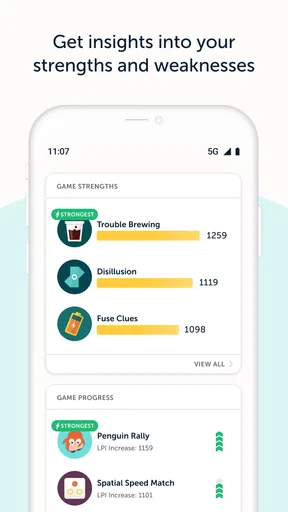
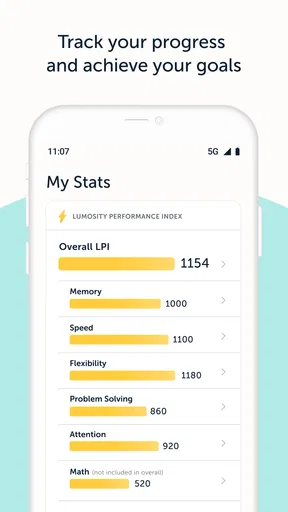
The progress views can make practice feel purposeful, but I’d use them as feedback about your activity in the app, not as a broad measure of mental ability. A graph moving upward may reflect familiarity with a game’s format as well as better performance. That is still useful: it shows that you are learning how to handle that particular challenge. It does not automatically tell you how you will perform at work, in class, or while remembering something unrelated.
For a fairer personal comparison, try playing under roughly similar conditions and look for patterns across multiple sessions instead of judging yourself by one unusually good or bad round. If you use the app after a long day, a slower result may say more about tiredness than about your underlying ability. I’d also treat reminders as optional prompts. They can help establish a routine, but missing a day should not make the experience feel like failure.
Worth Reading Before You Choose

EA SPORTS FC Mobile 26 Is a Bigger Football Game, but It Takes Time

Flipboard Shows What News Apps Must Do Beyond the Feed

Switching to Android Auto Means Rethinking Your Driving Routine

Google Calendar Makes a Crowded Week Easier to Manage

Ludo King Makes the Most of the Minutes Between Plans

Baby Panda World Brings Quick Play to Modern Phones, but Its Game Library Feels Busy
What the free option and paid access mean
Lumosity is free to install, with in-app purchases ranging from $0.99 to $159.99 per item. The app is made by Lumos Labs, Inc., and its education focus is reflected in the mix of guided challenges and progress feedback. If you are deciding whether to spend, first use the free experience long enough to learn whether you actually enjoy returning to it. Paid access is most relevant if the extra games or deeper performance insights matter to you; it is not necessary just to find out whether the basic style suits you.
I’d avoid buying anything because a single session made you feel you need to “fix” a weakness. Brain games are best approached as practice and entertainment, not a promise of a particular outcome. Check the purchase details in the app before confirming, and consider whether you want a recurring commitment or simply occasional access. The right choice depends less on how impressive a score looks and more on whether you find the exercises useful enough to keep using.
A realistic way to fit it into the day
Imagine having a few quiet minutes before starting homework or waiting for a bus. I’d open Lumosity, choose a short activity, and focus on one clear aim: understand the rules and give the task my attention. Afterward, I’d close the app and return to what I was doing, rather than letting a quick break expand into an open-ended session. That makes it easier to enjoy the games without confusing time spent training with progress on a separate goal.
This kind of routine also helps answer a common question: do you need to use it every day? I wouldn’t make daily play a requirement. Regular practice can make it easier to remember how individual games work, but a sustainable schedule matters more than forcing sessions when you are busy or distracted. If you like the format, choose a pace you can keep; if you don’t, there is little value in turning it into an obligation.
Where it sits among other brain games
Compared with picking random puzzles online, Lumosity offers a more guided experience, with a set of varied challenges and progress tracking in one place. That structure is convenient, particularly if you like seeing a record of your practice. The trade-off is that you are playing within the app’s selection and approach. A dedicated chess, crossword, or logic-puzzle app may be better if you want depth in one hobby, while a general puzzle collection may suit you if variety and free choice matter more than a training path.
I also wouldn’t choose it as a substitute for habits that directly serve a goal. To prepare for an exam, practising the subject is more relevant; to remember appointments, a calendar and reminders are more practical. Lumosity’s best role is narrower and clearer: a bit of guided mental play that can make a spare moment feel engaging. That boundary is not a flaw, as long as you know what you are opening it for.
So, I’ve been diving into the world of brain training apps, and guess what caught my attention? Yep, it’s Lumosity: Brain Training Games. If you’re like me and enjoy giving your brain a little workout while having fun, this might just be your kind of thing. Let me walk you through what I discovered.
First Impressions
When I first opened Lumosity, I was greeted with a clean and user-friendly interface. The app kicks off with a quick assessment to tailor the games to your cognitive needs. It’s like having a personal trainer, but for your brain. The setup is straightforward, and within minutes, you're all set to start training.
The Games
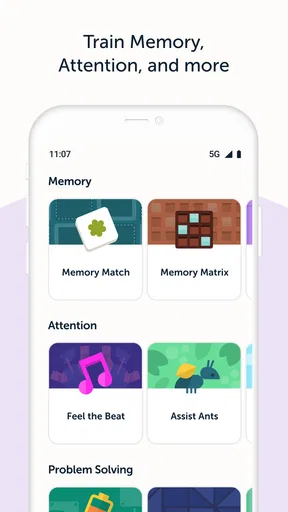
The app offers a variety of games designed to test different cognitive skills like memory, attention, and problem-solving. One moment you’re playing a quick reflex game, and the next, you’re solving a complex puzzle. The diversity keeps things fresh and engaging. Each game comes with a short tutorial, so you’re never left scratching your head.
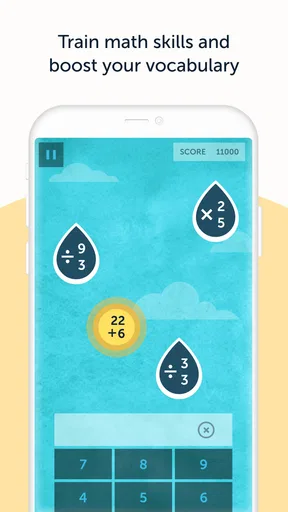
One of my favorites is the memory game with colorful tiles. It feels like a modern twist on the classic memory match we played as kids. And let’s not forget the math challenges that make you feel like a genius when you get them right!
Tracking Progress
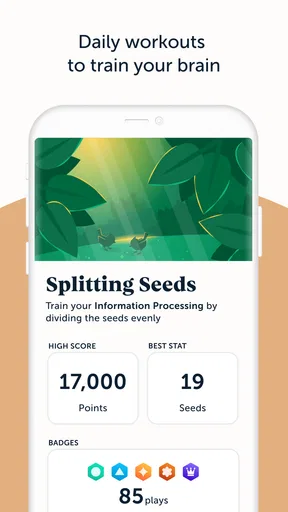
What’s really cool about Lumosity is its ability to track your progress over time. You get detailed insights into your strengths and areas that need improvement. It’s motivating to see those graphs inch upwards as your brain gets sharper. Plus, the app sends gentle reminders to keep you on track without being too pushy.
User Experience
Now, about the overall user experience – it’s pretty seamless. The app runs smoothly with no noticeable lags. The graphics are sleek, and the sound effects add a nice touch without being distracting. It's clear that a lot of thought went into making this app both functional and enjoyable.
Subscription Model
While Lumosity offers a free version, the premium subscription unlocks a lot more features. You'll get access to additional games and more in-depth insights into your performance. If you’re serious about brain training, the subscription might be worth considering. But hey, the free version is still pretty solid if you’re just looking to dip your toes in.
Is It Really Effective?
Now, the million-dollar question: does it work? From my experience, I’d say yes, to an extent. The games are designed to challenge your brain in different ways, and over time, you might notice improvements in your cognitive abilities. However, remember this isn’t a magic solution. Consistency is key, and integrating these exercises into your daily routine will likely yield the best results.
Overall, Lumosity: Brain Training Games is a great tool for anyone looking to give their brain a little extra exercise. Whether you’re a student wanting to improve focus, or just someone who enjoys a mental challenge, this app has something to offer. So, why not give it a try and see how your brain flexes its muscles?
Who should give it a try
Lumos Labs, Inc. has built an education app with broad appeal: it has a 4.7 average from around 307,000 ratings, and more than 10 million installs. It is rated for Everyone, so the presentation is accessible to a wide audience. The current version is 10.19.84, and it has been available since June 8, 2014. Those details suggest an established product, but the best test is still personal: do you enjoy its particular style of quick, guided challenges?
I’d suggest trying it if you like having a little structure around puzzles and find it satisfying to revisit familiar task types. I’d skip it if you dislike score-based activities, feel pressured by reminders, or expect a brain game to deliver a dependable change in real-world memory or attention. You can enjoy the challenge without treating every result as a diagnosis or a promise.
A sensible next step
After a few sessions, decide whether the app is earning its place in your routine. Ask yourself whether you look forward to the games, whether the instructions feel clear, and whether the progress view encourages you without making you anxious. If the answer is mostly yes, keep using it at a comfortable pace. If the routine feels repetitive, choose a different kind of puzzle or spend that time on the task you actually want to improve.
My overall impression is that Lumosity works best when I approach it as an enjoyable, bounded mental break. It is easy to start, offers enough variety to make a short session appealing, and gives a first-time user a clear path from learning the rules to settling into regular play. Its limits are just as important: it is not a substitute for studying, practical planning tools, or professional assessment. With that expectation in place, I’d recommend giving the free experience a try and deciding from your own sessions whether it suits you.
Pros
- Enhances cognitive skills effectively.
- Offers a wide variety of games.
- User-friendly and intuitive interface.
- Tracks progress with detailed insights.
- Personalized training plans available.
Cons
- Requires subscription for full access.
- Some games can become repetitive.
- Limited offline functionality.
- Performance might vary by device.
- Ads in free version can be intrusive.
FAQs for Lumosity: Brain Training Games
What is Lumosity and how does it work?
Lumosity is a brain training app designed to improve cognitive skills such as memory, attention, and problem-solving. It offers a variety of games that are scientifically developed to challenge different areas of your brain. Users can track their progress over time and see how they compare to others in their age group.
Is Lumosity suitable for all age groups?
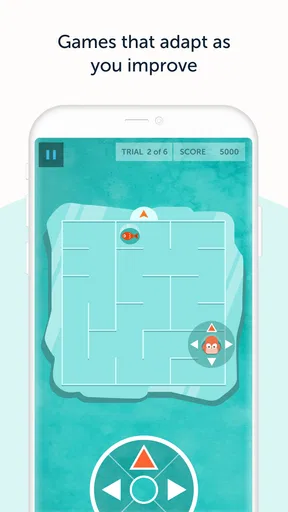
Yes, Lumosity is designed for a wide range of age groups. While it is most popular among adults seeking to enhance their cognitive abilities, it also features games that can be beneficial for younger users. The app adapts its difficulty based on the user’s performance, making it accessible for all ages.
How often should I use Lumosity for optimal results?
For optimal results, it is recommended to use Lumosity regularly, ideally a few times a week. Consistent practice helps reinforce cognitive skills and allows users to track their progress more effectively. The app offers daily challenges that can fit into short sessions, making it easy to incorporate into your routine.
Is there a cost associated with using Lumosity?
Lumosity offers both free and premium versions. The free version provides access to a limited number of games each day, while the premium subscription unlocks all features, including personalized training plans and in-depth performance tracking. Users can choose the option that best fits their needs and budget.
Can Lumosity be used offline?
Lumosity requires an internet connection to access its full range of features, including new games and progress tracking. However, some games may be available offline once they have been downloaded. For the best experience, it is recommended to use the app with an active internet connection.


